Introduction
Foodlay is a modern single-vendor restaurant management system built on top of the foodlay stack, combining a robust Laravel 12 backend with a dynamic Vue 3 frontend via Inertia.js.
- Backend: Laravel 12
- Frontend: Vue 3 (Composition API) with Inertia.js
- Styling: Tailwind CSS 4
- Build tool: Vite 7
- Database: MySQL 8+/MariaDB 10.5+
System Architecture
- Monolithic Laravel application with two decoupled frontend modules:
- Admin Panel: dashboard for managing orders, items, users, and settings
- Storefront: customer-facing web app for browsing menus and placing orders
Folder Structure
/app
/Http
  /Controllers
    /Api          (REST API V1)
    /Payment      (Gateways: Stripe, PayPal, etc.)
    /Web          (Inertia controllers: Admin, StoreFront)
  /Middleware
  /Requests
  /Resources
/config
/database
/public          (POINT DOMAIN HERE)
/resources
  /js
    /AdminPanel   (Admin Vue app)
    /StoreFront   (Customer Vue app)
    /components   (Shared UI)
    /lib          (Utilities)
  /css            (Tailwind entries)
  /views          (Blade entry points)
/routes
  /api            (Versioned API routes)
  /web            (Admin, Storefront, Installer)
/storage
.env
System Features
Dashboard & Analytics
- Real-time overview of orders, revenue, and active users
- Reports: sales & revenue, category & item performance, user activity, hourly trends
Order Management
- Full lifecycle tracking: Pending, Confirm, Processing, Handover, Picked Up, Delivered
- Delivery assignment (manual/automatic), invoice generation, refund workflows
Food & Menu Management
- Advanced item setup (description, images, pricing)
- Variations & addons; categories & sub-categories; labels & cuisines
- Bulk import/export via CSV/Excel
Marketing & Promotions
- Coupons with limits/expiry; BOGO; Happy Hour scheduling
- Loyalty points redeemable to wallet; push notifications via Firebase
- Sales popups for FOMO on storefront
User Management
- Employee roles & granular permissions
- Deliveryman management with shift tracking and earnings
- Customer wallet and CRM (orders, points, balance)
Website & Content
- Page builder for About/Privacy/Terms
- Blogs and FAQ modules
- Social links configuration
Settings & Configuration
- Payment gateways: Stripe, PayPal, Razorpay, Flutterwave
- SMS gateways: Twilio, Nexmo
- Firebase setup for notifications/auth; Mail via SMTP (Gmail, SES, Mailgun)
- Business info: currency, time zone, logo, branding
Communication
- Live chat between customers and Admin/Support
- Order-specific support channels
System Maintenance
- Database backups, system health view (PHP version, extensions)
- Activity logs for auditing
Security
- Role-based access control
- Secure login protections
Prerequisites
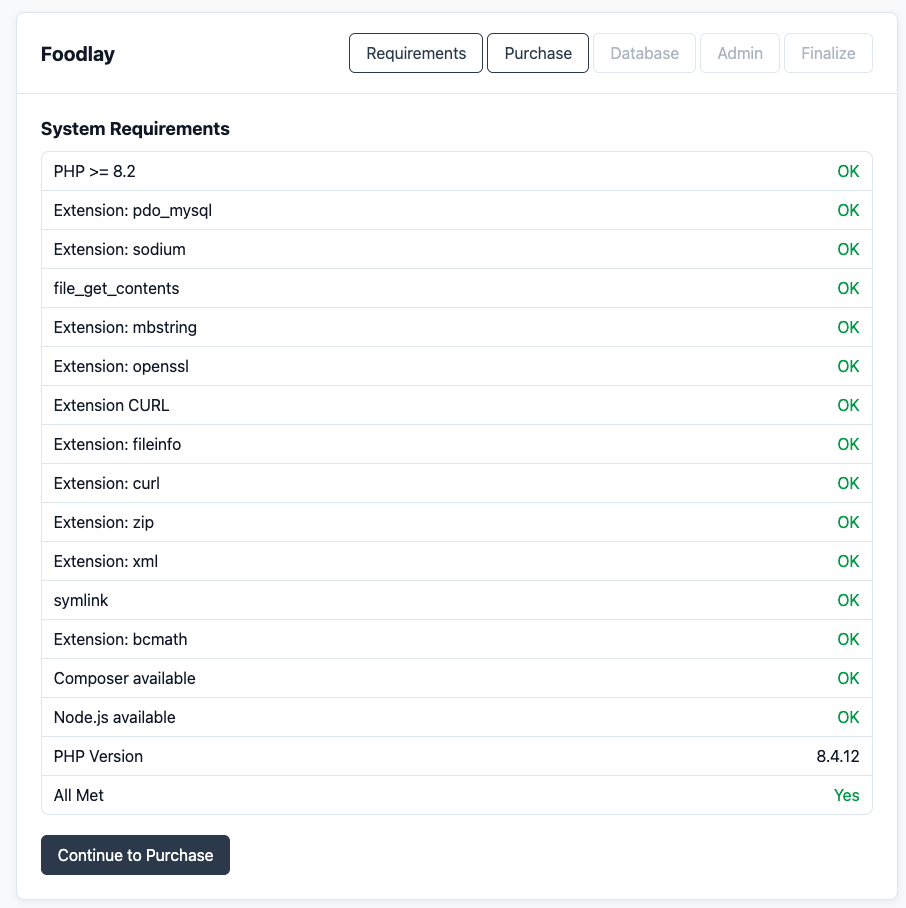
Server Requirements
- PHP ≥ 8.2
- Composer ≥ 2.5
- Node.js ≥ 18.x
- MySQL 8.0+ or MariaDB 10.5+
PHP Extensions
BCMath
Ctype
Fileinfo
JSON
Mbstring
OpenSSL
PDO (pdo_mysql)
Tokenizer
XML
curl
gd
exif
intl
zip
Quick Start Guide
Pre-flight Checklist
- Domain and hosting meeting prerequisites.
- Purchase code available.
- Empty MySQL/MariaDB database created.
4-Step Installation
- Upload and unzip install.zip.
- Point domain document root to /public.
- Run installer wizard in browser.
- Configure DB credentials and purchase code.
Post-Installation
- Configure business settings.
- Set up mail (SMTP).
- Configure cron job.
- Create zone and add first food item.
Installation Process
Video Walkthrough #
The full installation is broken into five numbered steps. Each step has its own permanent link so you can bookmark or share an exact step. Use the quick navigation below to jump straight to any step.
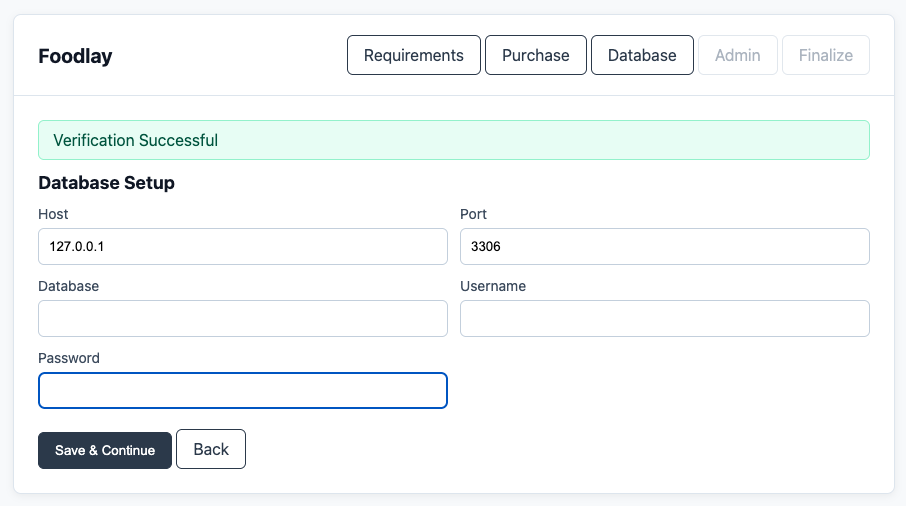
Step 1 — Create the Database #
- Step A: Create database via cPanel wizard (or
CREATE DATABASE foodlay;on CLI). - Step B: Create DB user and password.
- Step C: Assign ALL PRIVILEGES to the user.
Step 2 — Extract Files & Point the Domain #
- Upload and unzip install.zip to server root.
- Point domain/subdomain document root to
/public. - Ensure writable:
/storage,/bootstrap/cache,.env.
Step 3 — Install Dependencies #
vendor folder and
public/build folder are not included in the package. You must generate them yourself
after extraction by running the commands below.- Run
composer installto install PHP dependencies. - Run
npm installthennpm run buildto compile frontend assets.
composer install
npm install
npm run build
npm install and
npm run build locally and upload the generated public/build folder to the
server. See Development vs Production for the recommended build flags per
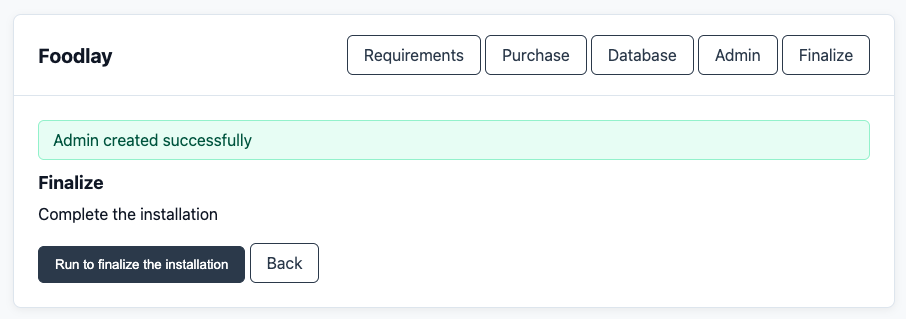
environment.Step 4 — Run the Installer Wizard #
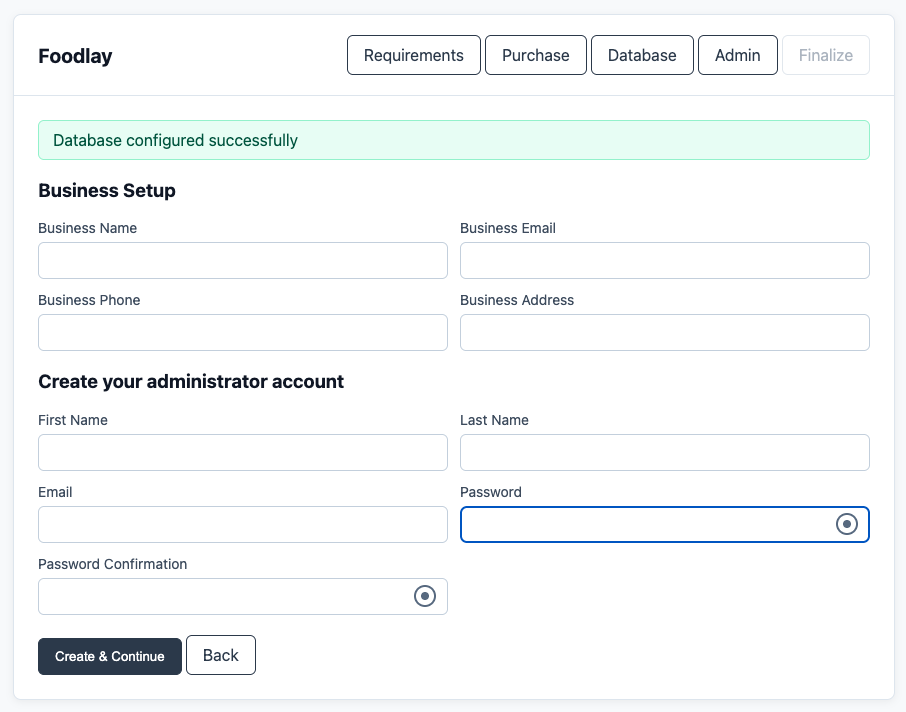
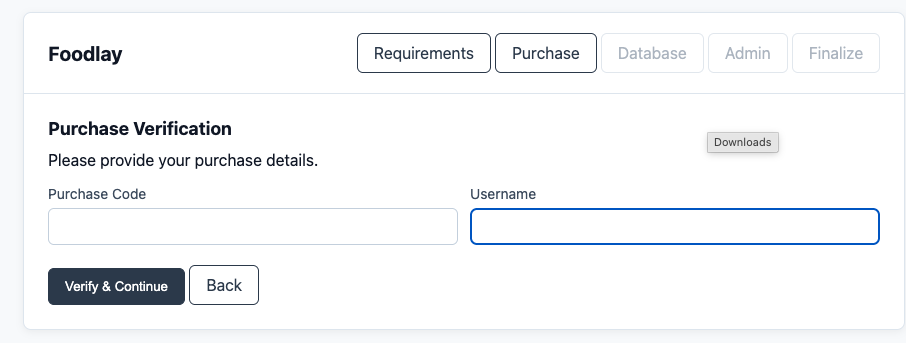
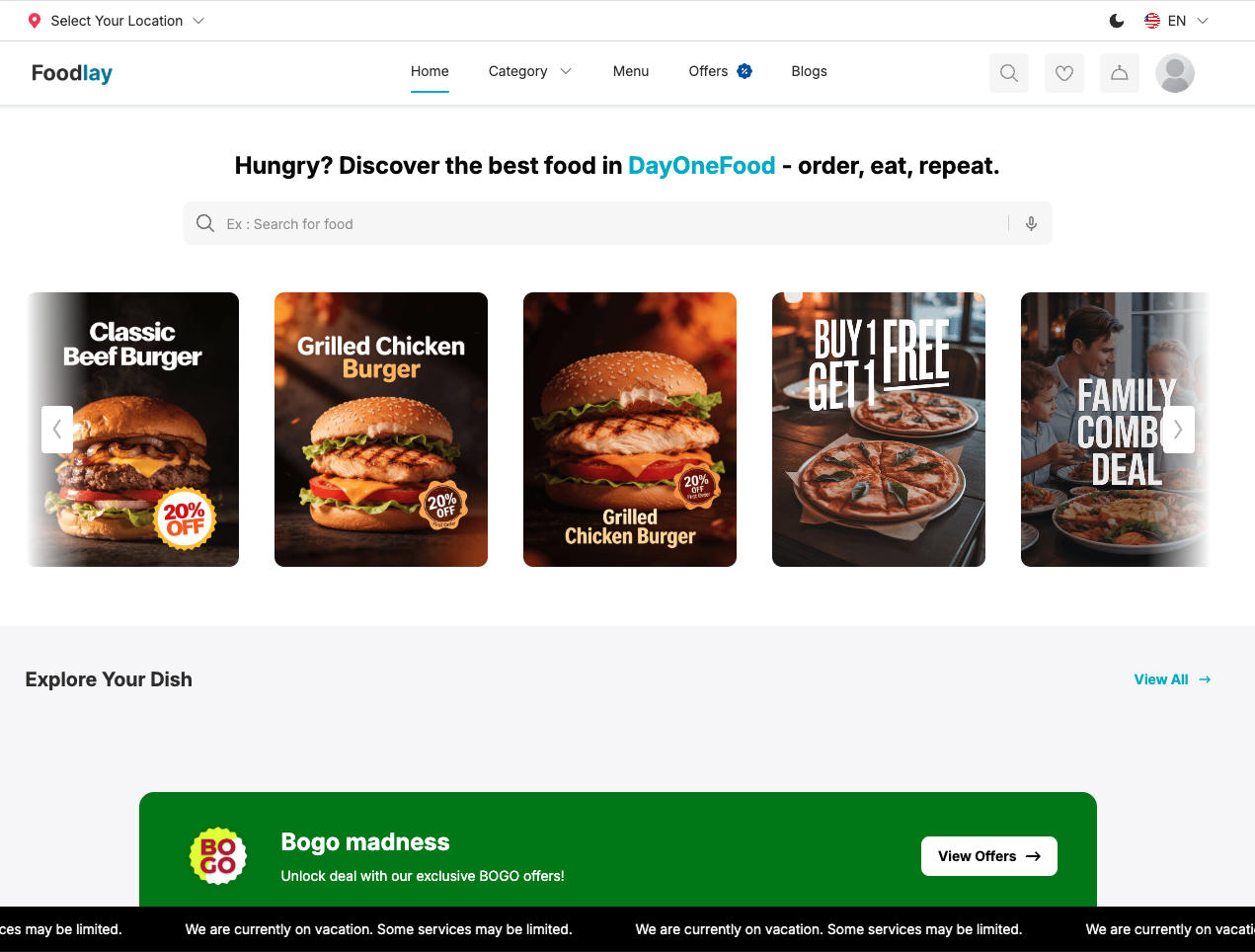
- Visit your site URL to start the installer.
- Enter DB credentials and your CodeCanyon purchase code.
- Finish and log in to the Admin Panel.
Step 5 — Post-Install Configuration #
- Configure business settings, currency, and time zone.
- Set up mail (SMTP) and Firebase for notifications.
- Add the scheduler cron job (see Server Configuration).
- Create your first delivery zone and add a food item.
Development vs Production
Foodlay runs in two clearly separated environments. Use a DEVELOPMENT
setup for local work and customization, and a PRODUCTION setup for
your live server. The table below summarizes the differences; the per-environment .env
blocks underneath are ready to copy.
| Setting | Development | Production |
|---|---|---|
| Goal | Local coding, debugging, customization | Live, customer-facing deployment |
APP_ENV |
local |
production |
APP_DEBUG |
true (show errors) |
false (hide errors) |
APP_URL |
http://127.0.0.1:8000 |
https://yourdomain.com |
| Run / serve | php artisan serve + npm run dev (HMR) |
Nginx/Apache + PHP-FPM, assets via npm run build |
| PHP dependencies | composer install |
composer install --no-dev --optimize-autoloader |
| Frontend assets | npm install → npm run dev |
npm ci → npm run build |
| Caching | None (clear caches freely) | config:cache, route:cache, view:cache |
| Queue / mail | QUEUE_CONNECTION=sync, MAIL_MAILER=log |
QUEUE_CONNECTION=database + worker, real SMTP |
| HTTPS | Optional | Required (SESSION_SECURE_COOKIE=true) |
DEVELOPMENT — local .env
APP_NAME=Foodlay
APP_ENV=local
APP_DEBUG=true
APP_URL=http://127.0.0.1:8000
LOG_LEVEL=debug
DB_CONNECTION=mysql
DB_HOST=127.0.0.1
DB_PORT=3306
DB_DATABASE=foodlay
DB_USERNAME=root
DB_PASSWORD=
CACHE_DRIVER=file
QUEUE_CONNECTION=sync
MAIL_MAILER=log
Start the development environment
composer install
npm install
php artisan key:generate
php artisan migrate --seed
php artisan serve            # http://127.0.0.1:8000
npm run dev                 # Vite dev server with hot reload (separate terminal)
PRODUCTION — live .env
APP_NAME=Foodlay
APP_ENV=production
APP_DEBUG=false
APP_URL=https://yourdomain.com
LOG_LEVEL=error
DB_CONNECTION=mysql
DB_HOST=127.0.0.1
DB_PORT=3306
DB_DATABASE=foodlay_prod
DB_USERNAME=foodlay_user
DB_PASSWORD=strong_password
CACHE_DRIVER=file
QUEUE_CONNECTION=database
SESSION_DRIVER=file
SESSION_SECURE_COOKIE=true
MAIL_MAILER=smtp
Prepare the production environment
composer install --no-dev --optimize-autoloader
npm ci
npm run build
php artisan key:generate
php artisan storage:link
php artisan migrate --force
php artisan config:cache
php artisan route:cache
php artisan view:cache
APP_DEBUG=true — it can leak
credentials and stack traces. Always rebuild caches after changing .env in production.
Basic Configuration
Core
- Business details, currency, time zone, branding.
- Enable/disable modules as needed.
Integrations
- Payment gateways: Stripe, PayPal, Razorpay, Flutterwave, etc.
- SMS gateways: Twilio, Nexmo, others for OTP.
- Firebase: push notifications and auth.
- Mail: SMTP (Gmail, AWS SES, Mailgun).
Environment
APP_NAME=
APP_ENV=
APP_KEY=
APP_URL=
DB_HOST=
DB_PORT=
DB_DATABASE=
DB_USERNAME=
DB_PASSWORD=
MAIL_MAILER=
QUEUE_CONNECTION=
BROADCAST_DRIVER=
CACHE_DRIVER=
Server Configuration
Local Development
- php artisan serve (local dev only)
- Access: http://127.0.0.1:8000
Production .env Essentials
- Disable debug in production and set a correct APP_URL.
APP_ENV=production
APP_DEBUG=false
APP_URL=https://example.com
LOG_CHANNEL=stack
CACHE_DRIVER=file
QUEUE_CONNECTION=database
SESSION_DRIVER=file
SESSION_SECURE_COOKIE=true
# If using subdomains:
SESSION_DOMAIN=.example.com
# If behind a proxy/CDN:
TRUSTED_PROXIES=*
Nginx
server {
    listen 80;
    server_name example.com;
    root /var/www/foodlay/public;
    add_header X-Frame-Options "SAMEORIGIN";
    add_header X-Content-Type-Options "nosniff";
    index index.php;
    charset utf-8;
    location / {
        try_files $uri $uri/ /index.php?$query_string;
    }
    location ~ \.php$ {
        fastcgi_pass unix:/var/run/php/php8.2-fpm.sock;
        fastcgi_param SCRIPT_FILENAME $realpath_root$fastcgi_script_name;
        include fastcgi_params;
    }
}
Nginx (HTTPS + Redirect)
server {
    listen 80;
    server_name example.com www.example.com;
    return 301 https://example.com$request_uri;
}
server {
    listen 443 ssl http2;
    server_name example.com;
    root /var/www/foodlay/public;
    ssl_certificate /etc/letsencrypt/live/example.com/fullchain.pem;
    ssl_certificate_key /etc/letsencrypt/live/example.com/privkey.pem;
    add_header Strict-Transport-Security "max-age=31536000; includeSubDomains" always;
    add_header X-Frame-Options "SAMEORIGIN";
    add_header X-Content-Type-Options "nosniff";
    index index.php;
    location / {
        try_files $uri $uri/ /index.php?$query_string;
    }
    location ~ \.php$ {
        # Adjust socket or use 127.0.0.1:9000 depending on your PHP-FPM setup
        fastcgi_pass unix:/var/run/php/php8.2-fpm.sock;
        fastcgi_param SCRIPT_FILENAME $realpath_root$fastcgi_script_name;
        include fastcgi_params;
    }
    location ~* \.(?:css|js|jpg|jpeg|gif|png|webp|ico|svg)$ {
        expires 7d;
        add_header Cache-Control "public, max-age=604800, immutable";
    }
}
Apache
<VirtualHost *:80>
    ServerName example.com
    DocumentRoot /var/www/foodlay/public
    <Directory /var/www/foodlay/public>
        Options Indexes FollowSymLinks MultiViews
        AllowOverride All
        Require all granted
    </Directory>
    ErrorLog ${APACHE_LOG_DIR}/error.log
    CustomLog ${APACHE_LOG_DIR}/access.log combined
</VirtualHost>
Apache (HTTPS + Redirect)
<VirtualHost *:80>
  ServerName example.com
  Redirect permanent / https://example.com/
</VirtualHost>
<IfModule mod_ssl.c>
<VirtualHost *:443>
  ServerName example.com
  DocumentRoot /var/www/foodlay/public
  SSLEngine on
  SSLCertificateFile /etc/letsencrypt/live/example.com/fullchain.pem
  SSLCertificateKeyFile /etc/letsencrypt/live/example.com/privkey.pem
  <Directory /var/www/foodlay/public>
    Options Indexes FollowSymLinks MultiViews
    AllowOverride All
    Require all granted
  </Directory>
</VirtualHost>
</IfModule>
LiteSpeed / OpenLiteSpeed
- Enterprise: point document root to /public; uses .htaccess
- OpenLiteSpeed: enable Rewrite and auto-load .htaccess in Virtual Host
SSL & Security
sudo apt install certbot python3-certbot-nginx
sudo certbot --nginx -d example.com
Subdomains for Admin & Storefront
- Point both example.com (storefront) and admin.example.com (Admin Panel) to the same /public.
- Ensure APP_URL matches the primary domain; use SESSION_DOMAIN=.example.com when sharing sessions across subdomains.
- If using a CDN/proxy (e.g., Cloudflare), set TRUSTED_PROXIES=* and keep APP_URL on https.
cPanel Alternative (if /public not possible)
- Upload project to /public_html/foodlay_core/
- Move all files from /foodlay_core/public/ to /public_html/
- Edit public_html/index.php paths:
require __DIR__.'/foodlay_core/vendor/autoload.php';
$app = require_once __DIR__.'/foodlay_core/bootstrap/app.php';
Permissions
- Ensure writable: /storage, /bootstrap/cache, .env
sudo chown -R www-data:www-data /var/www/foodlay
find /var/www/foodlay -type f -exec chmod 644 {} \;
find /var/www/foodlay -type d -exec chmod 755 {} \;
Cron Job
* * * * * php /path/to/artisan schedule:run >> /dev/null 2>&1
Queue Workers
- Use Supervisor/systemd when QUEUE_CONNECTION=database
# /etc/supervisor/conf.d/foodlay-worker.conf
[program:foodlay-worker]
process_name=%(program_name)s_%(process_num)02d
command=php /var/www/foodlay/artisan queue:work --sleep=1 --tries=3 --max-time=3600
autostart=true
autorestart=true
numprocs=2
redirect_stderr=true
stdout_logfile=/var/log/supervisor/foodlay-worker.log
CORS (API on another domain)
- If the mobile apps call this API from a different domain, configure config/cors.php accordingly.
'paths' => ['api/*', 'sanctum/csrf-cookie'],
'allowed_origins' => ['https://app.example.com', 'https://admin.example.com'],
'allowed_methods' => ['*'],
'allowed_headers' => ['*'],
'supports_credentials' => true,
Deployment
First-Time Deployment
- Point domain/subdomain document root to /public
- Upload project files to server
- Ensure writable: /storage, /bootstrap/cache, .env
- Create database and user, grant privileges
- Install PHP dependencies with production flags
- Generate APP_KEY and link storage
- Install Node dependencies and build assets
- Run migrations (and seeders if needed)
- Cache configuration and routes
composer install --no-dev --optimize-autoloader
php artisan key:generate
php artisan storage:link
npm ci
npm run build
php artisan migrate --force
php artisan config:cache
php artisan route:cache
php artisan view:cache
Post‑Deployment Checklist
- Visit / to ensure pages load and assets resolve
- Check APP_URL correctness and HTTPS redirects
- Verify public/build is present and Vite manifest loads
- Run health checks: DB connection, cache, queue
- Confirm storage symlink works (image uploads)
Backups & Rollback
- Backup database and .env before upgrades
- Keep previous release for quick rollback
- Restore DB from dump if migrations fail and rollback is required
cPanel Shared Hosting
- If document root cannot point to /public, move public files to public_html and adjust index.php paths
- Run
composer install --no-dev --optimize-autoloadervia SSH or cPanel terminal - Run
npm installandnpm run buildlocally, then upload the generatedpublic/buildfolder to the server
API Reference
The backend exposes a versioned REST API (API V1) consumed by the Admin, Customer, and
Deliveryman mobile apps. All endpoints are defined under routes/api/v1 and return JSON.
Base URL & Versioning #
https://yourdomain.com/api/v1
- All routes are prefixed with
/api/v1. - Roles are namespaced:
/api/v1/admin/*,/api/v1/deliveryman/*, and customer/storefront routes under/api/v1/*.
Authentication #
The API uses token-based authentication (Laravel Sanctum). Obtain a token from a login endpoint, then send it as a Bearer token on every protected request.
Authorization: Bearer <ACCESS_TOKEN>
Accept: application/json
Accept-Language: en
curl -X POST https://yourdomain.com/api/v1/admin/auth/login \
  -H "Content-Type: application/json" \
  -d '{"email":"admin@example.com","password":"your_password"}'
Standard Response Envelope #
{
  "success": true,
  "message": "Request successful",
  "data": { },
  "meta": {
    "current_page": 1,
    "per_page": 10,
    "total": 42
  }
}
Error format
{
  "success": false,
  "message": "Validation failed",
  "errors": {
    "email": ["The email field is required."]
  }
}
| Status | Meaning |
|---|---|
200 | OK — request succeeded |
201 | Created — resource created |
401 | Unauthenticated — token missing/expired |
403 | Forbidden — insufficient permissions |
404 | Not found |
422 | Validation error (see errors) |
429 | Too many requests (rate limited) |
500 | Server error |
Pagination, Filtering & Rate Limits #
- Use
?page=and?limit=(default 10) for paginated lists. - List endpoints accept filters such as
status,type,payment_status, and date ranges. - Throttling defaults to 60 requests/minute per token (configurable in
app/Providers).
Endpoints — Authentication #
| Method | Endpoint | Description |
|---|---|---|
| POST | /api/v1/auth/register | Customer registration |
| POST | /api/v1/auth/login | Customer login (returns token) |
| POST | /api/v1/admin/auth/login | Admin login |
| POST | /api/v1/deliveryman/auth/login | Deliveryman login |
| POST | /api/v1/auth/refresh | Refresh access token |
| POST | /api/v1/auth/logout | Revoke current token |
Endpoints — Customer / Storefront #
| Method | Endpoint | Description |
|---|---|---|
| GET | /api/v1/items | List food items (paginated, filterable) |
| GET | /api/v1/items/{id} | Item detail with variations/addons |
| GET | /api/v1/categories | List categories |
| POST | /api/v1/cart | Add/update cart items |
| POST | /api/v1/orders | Place an order |
| GET | /api/v1/orders | Customer order history |
| POST | /api/v1/coupon/apply | Apply a coupon code |
| GET | /api/v1/wallet | Wallet balance & transactions |
Endpoints — Admin #
| Method | Endpoint | Description |
|---|---|---|
| GET | /api/v1/admin/dashboard | Dashboard metrics |
| GET | /api/v1/admin/orders | List orders (filterable) |
| PUT | /api/v1/admin/orders/{id}/status | Update order status |
| POST | /api/v1/admin/item | Create food item |
| PUT | /api/v1/admin/item/{id} | Update food item |
| DEL | /api/v1/admin/item/{id} | Delete food item |
| POST | /api/v1/admin/coupon | Create coupon |
| GET | /api/v1/admin/refund-requests | List refund requests |
| POST | /api/v1/admin/business/setup | Update business settings |
Endpoints — Deliveryman #
| Method | Endpoint | Description |
|---|---|---|
| GET | /api/v1/deliveryman/orders | Assigned orders |
| PUT | /api/v1/deliveryman/orders/{id}/status | Update delivery status |
| GET | /api/v1/deliveryman/earnings | Earnings summary |
| POST | /api/v1/deliveryman/location | Push live location |
routes/api/v1. For the exhaustive, always-current list, run
php artisan route:list --path=api/v1 on your server.Database Schema
Foodlay uses a relational MySQL schema managed entirely through Laravel migrations in
database/migrations. The core tables and their relationships are summarized below.
| Table | Purpose | Key Relationships |
|---|---|---|
users | Customers, admins, employees, deliverymen | has many orders, addresses; belongs to roles |
roles / permissions | Role-based access control | many-to-many with users |
categories | Food categories & sub-categories | has many items; self-referencing parent |
items | Food items (name, price, stock) | belongs to categories; has many variations, addons |
variations / addons | Item options & extras | belongs to items |
orders | Order header (status, totals, payment) | belongs to users; has many order_items; belongs to zones |
order_items | Line items per order | belongs to orders and items |
zones | Delivery zones & charges | has many orders, deliverymen |
coupons / bogo / happy_hours | Promotions | applied to orders |
wallets / wallet_transactions | Customer wallet & loyalty points | belongs to users |
refund_requests | Refund workflow | belongs to orders, users |
transactions | Payment records per gateway | belongs to orders |
chats / messages | Live chat threads | belongs to users, orders |
settings | Business, payment, SMS, mail config | key/value store |
translations | Multi-language strings | polymorphic to localized models |
Inspecting the schema
- Review migration files in
database/migrationsfor exact columns and indexes. - Generate an up-to-date model/relationship map with
php artisan model:show <Model>. - Seed demo data with
php artisan db:seed(development only).
php artisan make:migration). Editing existing tables directly will break the built-in
updater.Update Procedure
Foodlay includes a built-in updater that allows administrators to apply new versions directly from the Admin Panel. Follow the steps below to safely update your Admin Panel and Web Storefront.
Before You Update
- Create a full database backup via phpMyAdmin, cPanel, or CLI
- Back up your .env file and any custom modifications
- Ensure your server meets the latest version's requirements
- Download the update.zip file from your purchase account
Step-by-Step Update Process
- Step 1: Log in to the Admin Panel using your administrator credentials.
- Step 2: Navigate to the updater page by visiting yourdomain.com/updater in your browser.
- Step 3: On the updater page, click the file upload area and select the update.zip file you downloaded.
- Step 4: Click the Update button to begin the update process.
- Step 5: Wait for the process to complete. The system will extract the files, apply database migrations, and clear caches automatically.
Post-Update Checklist
- Verify the application loads correctly and check for any errors
- Confirm the version number has been updated in the Admin Panel
- Test core functionality: placing an order, processing payments, and login flows
- Clear browser cache to ensure updated assets are loaded
Update Troubleshooting
- Upload fails or times out: Increase PHP upload_max_filesize and post_max_size to at least 64M in your php.ini
- Permission denied errors: Ensure /storage, /bootstrap/cache, and project root are writable by the web server
- 500 error after update: Run the following commands via SSH to clear all caches:
php artisan optimize:clear
php artisan config:clear
php artisan cache:clear
- Rollback: If the update causes critical issues, restore your database backup and replace the application files with your pre-update backup
Troubleshooting
500 Server Error
- Check storage/logs/laravel.log
- Fix permissions:
chmod -R 775 storage
chmod -R 775 bootstrap/cache
Vite manifest not found
- Ensure public/build exists and was uploaded correctly
Images not loading
- Link storage:
php artisan storage:link
404 Not Found (except homepage)
- Nginx: include try_files $uri $uri/ /index.php?$query_string;
- Apache: ensure .htaccess exists and mod_rewrite is enabled
Emails not sending
- Verify SMTP config; test connection
- Use QUEUE_CONNECTION=sync for testing or run workers
Class/Target not found
composer dump-autoload
php artisan optimize:clear
Changes not reflecting
php artisan optimize:clear
php artisan config:clear
php artisan cache:clear
419 Page Expired (CSRF)
- Check SESSION_DOMAIN; ensure sessions path is writable; set SESSION_SECURE_COOKIE when HTTPS
Mixed Content (HTTP/HTTPS)
APP_URL=https://yourdomain.com
Composer platform issues
composer install --ignore-platform-reqs
SQL strict mode errors
- Set 'strict' => false in config/database.php and clear config cache
Large file uploads fail
upload_max_filesize = 64M
post_max_size = 64M
memory_limit = 512M
Node/Vue build issues
rm -rf node_modules package-lock.json
npm install --legacy-peer-deps
export NODE_OPTIONS=--max_old_space_size=4096
npm run build
Customization
Controllers & Services
- Controllers in app/Http/Controllers handle requests
- Services in app/Services encapsulate business logic
Models
- Use migrations for schema changes; update model $fillable
php artisan make:migration add_column_to_items_table
Frontend (Vue 3 + Inertia)
- Pages in resources/js/Pages
- Components in resources/js/Components
- Run npm run dev for HMR; npm run build for production
Styling & Themes
- Tailwind CSS entries in resources/css
- Rebuild assets after changes
Translations
- Manage languages via Admin Panel; developer seeds in database/seeders
Email Templates
- Blade templates at resources/views/emails
Routes
Route::get('/', fn () => Inertia::render('StoreFront/Home'));
Route::get('/admin', fn () => Inertia::render('AdminPanel/Dashboard'));
Support Scope
Before Contacting
- Read this documentation thoroughly
- Check Troubleshooting section
- Search marketplace comments for similar issues
Version History
Version 2.0 Latest
- Upgraded backend to Laravel 12 with full PHP 8.2+ support
- Migrated frontend to Vue 3.5 + Inertia.js 2.0 with Composition API
- Upgraded build tooling to Vite 7 and Tailwind CSS 4
- Added Happy Hour scheduling with time-based discount rules
- Added BOGO (Buy One Get One) offer support
- Added Invoice Setup — customizable invoice templates per business
- Added Refund Management — admin refund request handling with status tracking
- Added Tax Management — flexible tax rules per item and category
- Added Real-time Chat between Admin, Customers, and Delivery staff via Laravel Reverb (WebSockets)
- Added Two-Factor Authentication (TOTP) for admin accounts
- Added Loyalty Points system — earn and redeem points via wallet
- Added Wallet — customer wallet with top-up and transaction history
- Added Referral System — referral codes with configurable rewards
- Added Blog Module — full blog management with categories and rich-text editor
- Added Newsletter subscription management
- Added AWS S3 integration for cloud media storage
- Added Google reCAPTCHA v3 on login and registration
- Improved Admin Panel UI with shadcn-vue component library
- Improved Storefront with enhanced product and category browsing
- Performance improvements via optional Laravel Octane (Swoole) support
- Built-in one-click updater at
yourdomain.com/updater
Version 1.0
- Initial release
- Laravel 11 backend with Vue 3 + Inertia.js frontend
- Full order lifecycle management (Pending → Delivered)
- Category, food item, and addon management
- Delivery assignment and zone management
- Payment gateway integration (Stripe)
- Firebase push notifications
- Multi-language support (EN, BN, HI, AR, ES)
- Customer-facing web storefront
- Admin panel with dashboard and analytics
- Role-based employee access control
- Coupon and discount management
- Customer and deliveryman management
- SMTP email integration